Anatomy of React
10-01-20261925 words10 min read
INTRODUCTION
My earliest exposure to React took place around 2022, when I was building calculators and counter games in Vanilla Javascript. Back then, in order to update a part of the UI, I would first use selectors (document.querySelector, document.getElementById and document.getElementsByClassName) to pick that specific component and then describe the logic for the update. But, with this approach, there was a lot of scope for things to go wrong. That is what changed with React - I no longer had to directly manipulate the DOM. I could just define a state to store data, write my JSX around it and leave the logic for re-rendering to React.
But what am I doing writing this post on React Architecture, you ask? Well, certain concepts can be a bit challenging to understand in the beginning, but having a low level implementational understanding(to find out why things are the way they are) combined with practice helps. As for me, I wanted to understand the new performance hooks introduced after React V16(I shall create a seperate post for those), but the intriguing part is that the Fiber Architecture was the whole reason they got introduced in the first place, so, all the more reason for me to be doing this.
Fundamentals
This section deals with some fundamental components in the react ecosystem, whose knowledge is very much required to understand the fiber implementation. (Feel free to skip it if you are already familiar with it though.)
State is Neither Ephemeral Nor Permanent
Unlike normal variables which are stored in memory and thus are ephemeral/temporary, state is different - it is stored between renders. This behavior is exactly why, when setState functions are executed, the new value gets updated in the UI. Setter functions are special - they make React remember the state's updated value.
However, React state is not permanent either. This can be proven by the fact that once a state gets updated and the user refreshes the page, the state falls back to the value it was initialized with.
Rendering vs. Reconciliation
React can render to multiple environments, with three main targets:
- DOM (Web)
- iOS (iPhones and iPads)
- Android Views (Android phones)
This is possible because rendering and reconciliation are separate processes. The reconciler figures out which parts of the app to update, while the renderer uses that information to create a set of instructions for the Browser or the OS to update the actual app. React Native and React can have their own renderers, but they share the same reconciler provided by React core.
Having said that, rendering happens in both the React ecosystem and the browser, but the final output on the user's screen(or the webpage) is powered by the browser-based rendering.
Virtual DOM
The concept of rendering only that part of the UI which has actually experienced updates - The Virtual DOM. (Though it is increasingly being considered an unnecessary overhead by a lot of other frontend libraries, but let’s save that for another post.)
The idea behind VDOM is simple, react builds a copy of the DOM using current state, compares it with the previous VDOM and implements the differences into the original DOM(browser). This leads to better performance, as React only has to update the affected nodes.
*Fun fact! Virtual DOM is just a term that is used to refer to the whole diffing-reconciliation process, before React V16, it refered to the Stack reconciler's functionality, now it refers to the Fiber Reconciler instead.*
The Event Loop
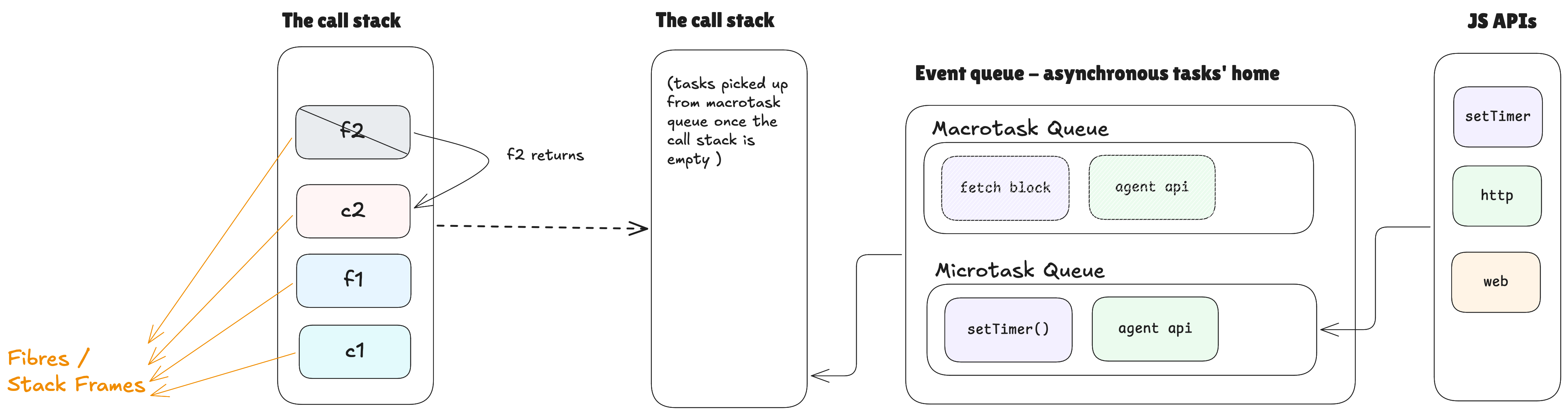
The Event Loop consists of the following components :
- The call stack
- Web /Node.js APIs
- Macrotask Queue/Callback Queue/ Task Queue
- Microtask Queue
The main component here is the call stack, which works on the recursive principle, whereby, it runs a function and runs the next function called within it(callback function), this process continues until the last function is executed and it returns, in which case we traverese down to empty the stack.
The Web /Node.js APIs run asynchronous tasks on a different thread from the main. They are given control when certain functions that are not part of the jvascript browser come up for execution, as a result, the functions get executed and return control to the parent macrotask whose child function it was.
The microtasks take higher priority than the macrotasks and it is the reason that after the execution of synchronous functions and when the call stack is empty, a function is picked from the macrotask queue and placed in the stack and executed, then, its microtask is executed immediately and this process keeps repeating, until there is no task left in the macrotask.
STACK RECONCILER - THE OLD WAY
Before React V16, this is how React determined which part of the UI is to be updated, followed by a change in state. It was powered by ‘The Diffing Algorithm’ and Virtual DOM in the following way:
- React keeps a copy of the DOM with the current state - a virtual DOM, always.
- Upon every state/prop change, React creates a new Virtual DOM tree and compares it with the previous one.
- The Diffing Algorithm is used to find the points of difference between the two Virtual DOMs.
- The differences are applied by the Reconciliation Algorithm to the actual DOM.
FIBER RECONCILER - THE UPGRADE
Fiber is a complete rewrite of the Stack Reconciler, it was mainly designed to accomplish better responsiveness and concurrency. With Fiber, React can :
- Break up the process of re-rendering into smaller tasks, called fibers
- Assign different priorities to the tasks
- Stop, resume or restart a task by priority.
The Call Stack powers javascript behind the scenes, even with fiber now which is an improved version of the call stack. Fiber is essentially a call stack with an extended set of operations to control it, earlier it could only be kicked off and it would stop once all of the rendering work was done, but now it can be turned on, paused, resumed, restarted and quit.
Fiber also gave birth to new hooks like - useTransition, useDeferredValue, useInsertionEffect, useId and useSyncExternalStore.
Why did we need the upgrade?
The main reason was frame drops. Frame drops cause janky animations and bad UX. But what causes frame drops?
A video/animation is a set of images being shown one after another at a fast enough speed, that our mind ends up believing them to be a record of things hapenning in real time instead of just being digital prints of specific moments in time.
Now, in the context of web-apps, a frame consists of all that you see in a webpage during a period of 16.6ms. Why 16.6ms? To give the impression to users that the app is highly responsive to their interactions with it, 16.6ms just happens to be the most optimum time limit to achieve that. Browsers are programmed to refresh every 16.6ms, they can't avoid it. So it can either show new content in the next frame or still the stale content. The latter is what causes jank in UI and can be called a 'frame drop'.
With Fibers we can prioritize, pause, resume, restart and quit tasks, which means we have greater control over the frame refresh cycle, therefore we can ensure much better ux and performance.
What is a Fiber?
A fiber can be called :
- a customizable representation of a function-call
- stack-frame in the Javascript call stack
- a data structure that represents a unit of work
Creation of a Fiber node
A Fiber node is created for each element returned by render(), after that it gets reused, in the way that React updates the parts of it which are changed in the subsequently returned version of the element. If in case the element is not returned in render(), the fiber is deleted and if its props have changed, it's fiber's heirarchy is changed in the fiber tree too.
A particular fiber has the following components:
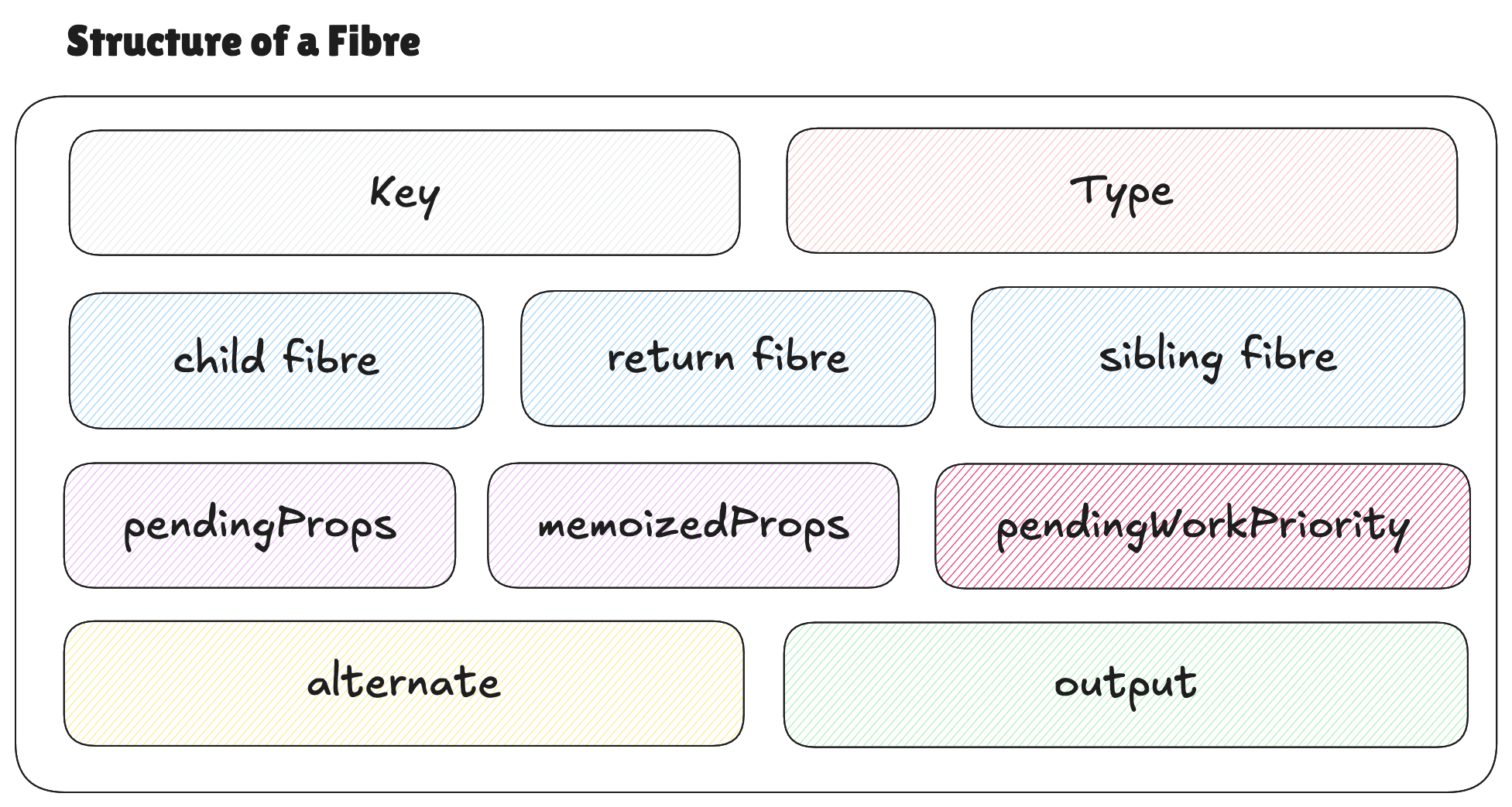
A majority of these look like properties that any given component in javascript would have(especially key, type, pendingProps, memoizedProps and output), that's because they are, all of them get copied from a function to a fiber, when the latter is created during a rendering cycle. As for the three types of fibers - child, sibling and return fibers, they just respresent fibers for the children components. Lastly, pendingWorkPriority, is the property that dictates the customizable behaviour of fibers, because it helps set priority for different tasks which eventually get analysed by the scheduler.
- key: the 'key' attribute passed to the component, if not, created by React itself, it is used to uniquely remember the component to maintain rendering order
- type: same as the type given to the component
- pendingProps: the props passed to a component by its parent
- memoizedProps: they are set equal to pendingProps on mount, in subsequent re-renders, the fiber node is reused if the new pendingProps = memoizedProps
- return fibers: "the fiber to which the program should return after processing the current one"
- child fibers: child component rendered by the current component
- sibling fibers: multiple child components rendered by the current component
- pendingWorkPriority: priority decided for a task (>=0), higher the value lower the priority, except, 0 priority means a no-task
- output: "The leaf nodes of a React application. They are specific to the rendering environment":
- web: html tags
- mobile OS: views
- alternate: Flushed fiber and Work-in-progress fibre are alternate to each other.
Fiber Tree
At this point it is important to draw a differentiation between the DOM Tree and the Fiber Tree. The first is a browser's internal representation of a react app and it consists of the host tags (like <html>, <head>, <h1˘> etc.). The second on the other hand is internal to the React engine, it is a specialised representation of React components that lets it visualize the relationship between different fibers in the form of a linked list where any two given nodes can have one of the following relationships:
- return fiber
- child fiber
- sibling fiber
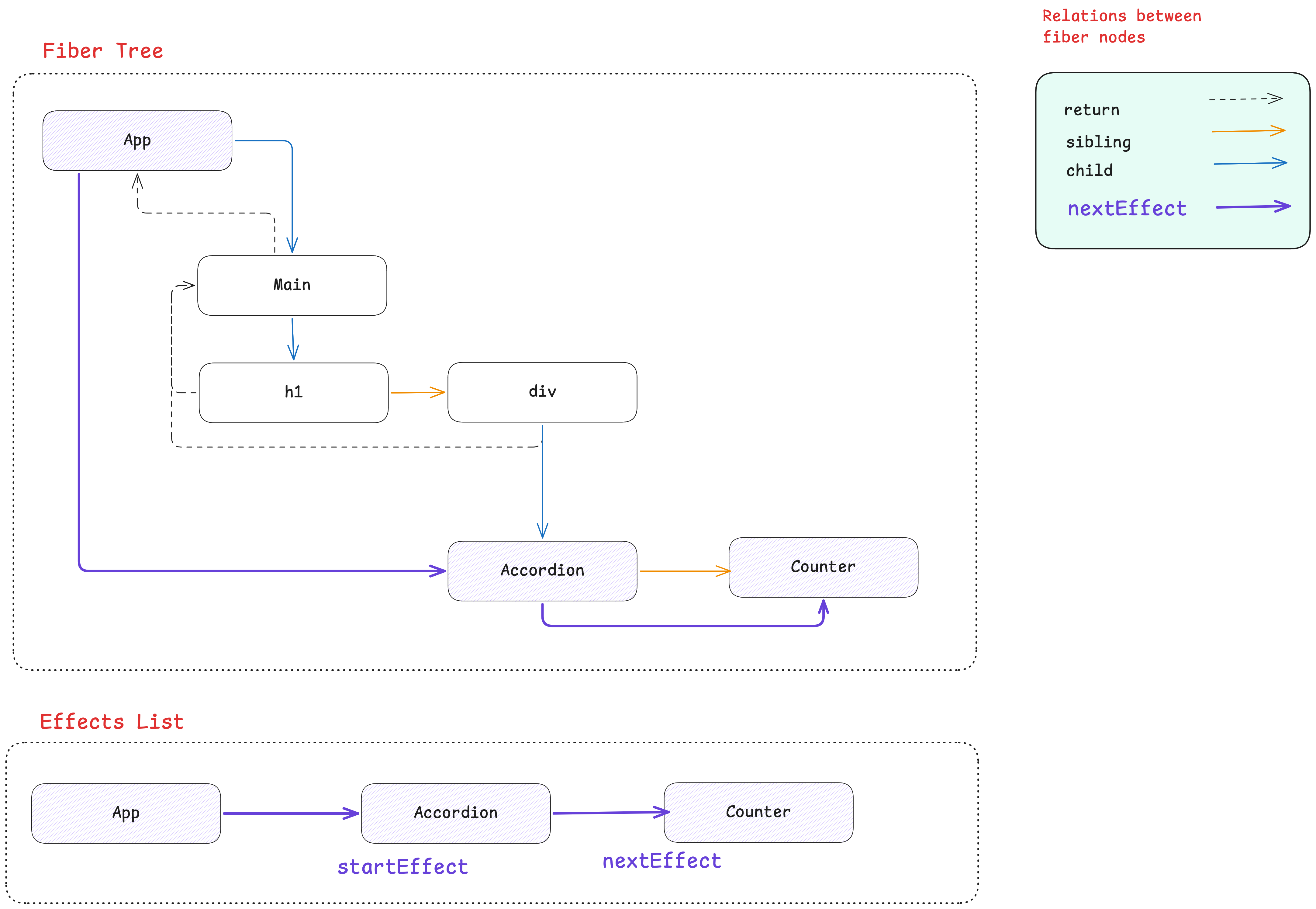
For a given component instance at a time, React maintains the current fiber and its alternate, that is, the work-in-progress fiber takes birth when some change has to be applied to the DOM in the browser.
It performs the reconciliation/render phase on the work-in-progress fiber and the commit phase to the current fiber.
Flushed fiber is the one whose output is already visible on the screen, and Work-in-progress fiber is the one that still exists in the call stack.Render phase is interruptible, Commit phase is not.
The fiber tree is built during the render/reconciliation phase, wherein each node corresponds to an element returned by the render() function. On subsequent updates, the existing work-in-progress tree is updated keep the changed elements of render into consideration. Afterwards, a list is formed using the nextEffect pointer, to connect all those nodes which have effects associated with them. This is done in order to efficiently apply updates in the app, by only visiting those nodes which have actually experienced some update.
"The whole point of rendering was to determine which nodes need to be inserted, updated, or deleted, and which components need to have their lifecycle methods called. And that’s what the effect list tells us. And it’s exactly the set of nodes that’s iterated during the commit phase."